
QR codes are no longer scanned out of curiosity. Today, people scan with a clear goal. They want something immediate, useful, and worth their attention.
A slow page, unclear message, or wrong destination can make them leave in seconds. That is why sending users from a QR code to a general homepage often reduces effectiveness instead of improving results.
For businesses, this directly affects campaign ROI, lead quality, and conversion rates.
Around 83% of QR code landing page traffic now comes from mobile devices.
Users may scan QR codes from packaging, posters, restaurant tables, event banners, or printed materials. Within seconds, they decide whether to continue or leave.
This makes your scan-to-lead journey one of the most important parts of modern marketing.
A well-designed QR landing page does more than open a link. It connects offline attention to immediate digital action.
The objective is to increase conversions, capture higher-quality leads, and improve campaign performance. Even small landing page improvements can have a measurable impact.
This guide covers practical QR code landing page tips, smart design ideas, and conversion-focused methods that match how users interact today.
The 9 Best QR Code Landing Page Tips for Higher Conversions
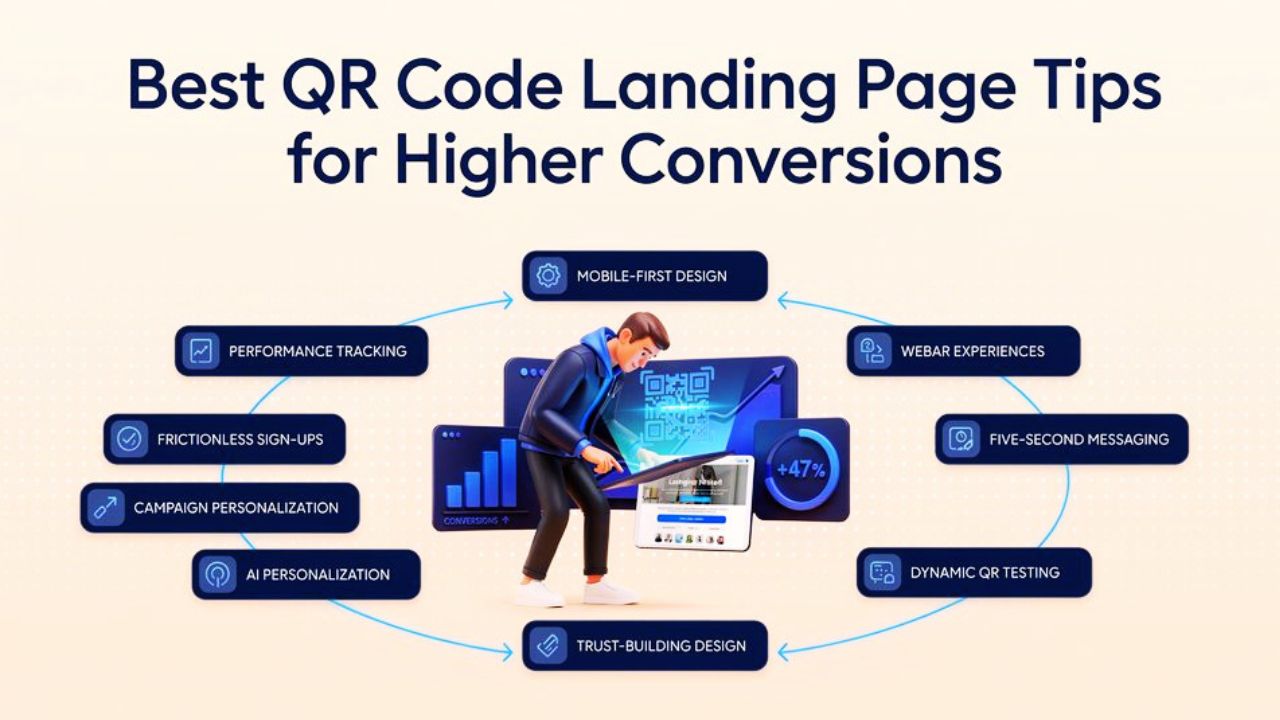
1. Build for Mobile First, Not Just Mobile Friendly
Nearly all QR scans take place on mobile devices, so your design should adapt to how people hold and use their phones. Long text blocks should be avoided because scanned visitors typically want quick information, and important actions should remain within the natural thumb zone.
A strong layout includes:
- Large tap-friendly buttons
- Short sections with clear spacing
- Fast-loading mobile visuals
Action: Do remember to place your main CTA near the lower center of the screen for easy thumb access.
2. Leverage WebAR for Immersive Product Previews
Today, consumers expect to preview products before making a purchase, and a QR code landing page can now take them to a landing page where they can instantly view furniture in their room, test product size, or explore packaging in 3D without having to download an app.
This is particularly beneficial for:
- Furniture brands
- Fashion accessories
- Home decor
- Consumer electronics
3. Make Your Message Clear Within Five Seconds
You should know that the first few seconds decide whether a visitor stays or leaves, and your landing page should instantly match what the QR code promised. If someone scans expecting an offer, reward, or information, that exact message should appear immediately after the page opens.
- Clear headline
- One short supporting sentence
- One visible CTA & no extra distractions
Avoid extra distractions, and the faster users understand the page, the higher the chance they will continue to do so.
4. Use Dynamic QR Codes to Test What Works Better
The use of dynamic QR codes provides you with more control because the destination link can be updated at any time without the need to print new codes. This makes testing easier and improves campaign outcomes.
You can compare different offers, such as:
- Version A: 10% discount
- Version B: Free shipping
A recommended tool for this is Qroq, which helps create dynamic QR code campaigns and track scan performance efficiently, and testing helps improve conversion rates.
5. Follow Modern Visual Styles That Build Trust
Visual trends such as glassmorphism, soft transparency, layered cards, and strong contrast are frequently used on modern QR code landing pages, making them appear more contemporary and professional. These design features have an immediate impact on trust.
Useful visual elements include:
- Translucent form blocks
- Soft shadows & Dark mode contrast
- Minimal section borders
6. Add One-Tap AI Personalization
When a QR code landing page instantly feels relevant to the person who scanned it, it performs better. You can display the appropriate message at the appropriate time by keeping small details like location, time, or device.
For example, a cafe QR code can display the latest pastry you launched and special offers according to the day being celebrated and highlight the best category ones for the favorite customers.
This creates a more personal experience, keeps attention longer, and increases the chance of conversion.
7. Personalize Landing Pages for Each Campaign
One QR code = one purpose.
Each QR code should direct users to a QR code landing page that is appropriate for its purpose, for example, a QR code printed on packaging should guide users differently from one placed on an event banner or flyer.
- Create separate pages for packaging, events, flyers, and ads
- Adjust the message for each audience
- Use visuals that match the campaign style
Using tools like QROQ, personalized landing pages with your logo, brand colors, and distinctive design elements consistently outperform generic ones and increase scan rates.
8. Eliminate Forms with Digital Wallets & Social Sign-On
Users are frequently slowed down by lengthy forms, particularly on mobile devices. Allow users to proceed with simple one-tap options, such as paying with Apple Pay or Google Pay or logging in via Google or Apple, to streamline the process. These are particularly useful for:
- Event registrations
- Product samples
- Quick bookings
9. Track Performance and Keep Improving
After a landing page is launched, it should continue to improve. You can then monitor how users interact with the page and use that information to make better decisions.
Keep an eye on key metrics such as scan volume, bounce rate, CTA clicks, page time, and conversion sources. Test minor adjustments on a regular basis and experiment with different headlines, button text, and offers to see what works best.
Qroq, for example, can help you monitor live scan activity and adjust your campaign in response to actual user behavior.
Checklist for QR Code Landing Page (Quick Wins Before You Publish)
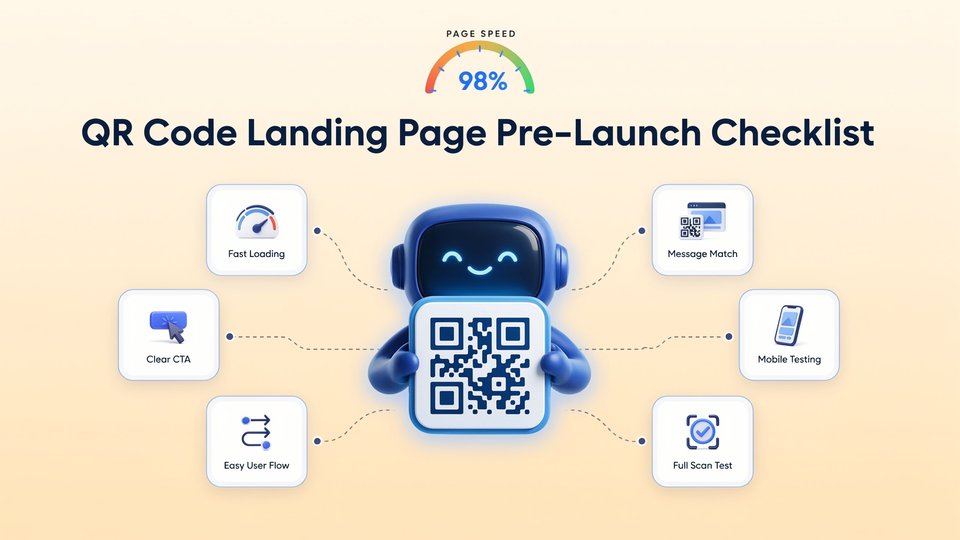

Before you publish a QR campaign, run through this quick checklist to make sure the landing page is ready to convert. A few small fixes here can make a big difference after the first scan.
1. Check if the page loads instantly
In this case, you must ensure that the scanned visitor expects the QR code landing page to open immediately, and if it takes too long, most users will abandon the page before seeing the offer.
A simple test: scan your own QR code using mobile data and check how quickly the first screen appears.
2. Content matches the QR code surprise
The landing page should immediately continue the same promise shown near the QR code. If the QR code mentions an offer, discount, booking option, or product detail, users should see that clearly as soon as the page opens.
✔ A quick check: after scanning, can someone understand within seconds that they reached the correct page?
3. Keep one action easy to spot
Every landing page should guide users toward one clear action. This could be buying a product, booking a service, signing up, or claiming an offer.
Keep the main button easy to spot without extra scrolling, and avoid adding too many competing options on the first screen.
You can also examine how visitors engage with that action and identify areas that require improvement with the aid of tools like Qroq.
4. Test the page on different phones
On one phone, a QR code landing page might appear tidy, but on another, it might look crowded or uneven. Device-to-device variations can occur in button placement, font spacing, and screen size.
Before publishing, test the page on different phones to make sure text remains readable, buttons stay easy to tap, and sections feel balanced.
5. Check If the Page Feels Easy to Follow
A visitor should never have to guess what to do next. Keep the layout simple, remove extra distractions, and make sure each section naturally leads to the next.
When the page feels easy to follow, users are more likely to complete the action you want.
6. Review the Full Scan Experience Before Launch
You always need to test the full journey yourself, from scanning the QR code to completing the action on the landing page.
This final review helps you notice small issues early and improve the user experience before real visitors arrive.
Conclusion
As you get to the end, you know that the QR code may begin the journey, but the landing page decides whether that visit turns into action.
Users frequently depart within seconds if the QR code landing page opens slowly, is confusing, or does not match what the scan promised.
The good part is that better results usually come from simple improvements: faster mobile loading, clearer first messaging, a visible CTA, and content that feels useful immediately.
Successful QR code campaigns have a single, distinct objective: each scan should result in a brief, significant experience with the appropriate choice.
By assisting you with page testing, scan monitoring, and campaign optimization using actual performance data, Qroq makes this process simpler.
Before launching your next QR campaign, ask yourself one question: if someone scans right now, will the page give them a reason to stay? That answer often determines whether a scan becomes a conversion.
FAQs about QR Code Landing Page Tips
Q1: What is the most important element of a best QR code landing page?
A: The most important element is message matches the alignment between what the QR code promises (in the physical call-to-action text next to it) and what the landing page delivers in the first five seconds.
Q: How long should a QR code landing page be?
A: One to two screens of vertical scrolling is acceptable for product showcase pages or event information, while longer pages are fine for educational or high-consideration purchases, but the CTA must be visible above the fold and repeated at regular intervals as the user scrolls.
Q: What is the best tool for creating these codes?
A: For 2026 standards, we recommend using a professional-grade tool like QROQ (or similar dynamic generators) that offers built-in analytics, A/B testing, and ultra-fast redirect speeds.
Q: How do I measure QR landing page success?
A: Track four key metrics: scan-to-conversion rate, bounce rate, time on page, and revenue per scan. Set these up in Google Analytics 4 with UTM tags and conversion events before launching.